Guide
Google Analytics MCP: ask GA4 instead of clicking through it
Written by Daniel Klose · Updated 8 November 2026
A Google Analytics MCP server connects an AI assistant like Claude or ChatGPT to your GA4 property. MCP, the Model Context Protocol, is the standard these assistants use to call outside tools; the Google Ads MCP guide explains it in more detail. Once the server is connected, you ask in the chat and the assistant pulls the report from the GA4 API itself.
I’m Daniel, and I build AdLoop. GA4 is the part of my week I like least. Half of what I want to know sits in Explorations, the other half in a standard report I can never find again. So AdLoop reads GA4 right next to the ad accounts. Further down I compare it with Google’s own Analytics server, which for some people is the better choice.
What you can ask
- “Which landing pages got the most sessions from paid search last month, and how many of those sessions ended in a sign-up?”
- “Compare the last 28 days with the 28 before, by channel. Which channel moved, and by how much?”
- “We just deployed the new checkout. Is the purchase event coming in? Check realtime.”
- “Which events does this property receive, and which of them count as key events?”
- “newsletter_signup fires but doesn’t count as a conversion. Mark it as a key event, once per session.”
The last one changes your property, the others only read. You don’t need to know GA4’s field names for any of them. The assistant first looks up which dimensions and metrics your property offers, custom ones included, and then builds the report.
What GA4 alone can’t answer
GA4 sees what happens on your site. It doesn’t see what the click cost. Most questions worth asking need both, like what a conversion really costs per campaign, or which landing pages get paid traffic and never convert. AdLoop reads Google Ads and GA4 through the same connection, so the assistant can put both into one answer.
That join has a trap, and almost everyone advertising in Europe falls into it at some point. Google Ads counts every click. GA4 only records visitors who accepted analytics cookies, and in EU traffic 30 to 70 percent of them decline. Two to five ad clicks per GA4 session is therefore normal, not broken tracking. AdLoop’s cross-checks account for this consent gap and say so in their answer, so your assistant doesn’t send you hunting for a bug that isn’t there.
Real tracking problems still show up, for example an event that stopped arriving or a paused tag in Tag Manager. If your assistant can read your website’s code, as Claude Code or Cursor can, it compares the events in the code with what GA4 actually receives.
Google’s official server and AdLoop
Google publishes its own Google Analytics MCP server on GitHub (googleanalytics/google-analytics-mcp), and it’s good. It reads reports, realtime data, funnels and model-based attribution. Google’s developer guide calls it read-only, but the current version on GitHub can also create annotations, custom dimensions and key events once you switch writing on. Those changes happen the moment the AI calls them, with no preview and no approval. If you only need to read GA4 and you’re at home in a terminal, it does the job and costs nothing.
You run it yourself, locally through pipx or uvx, or with Docker on Cloud Run or your own server. Google doesn’t host it for you. Setup needs a Google Cloud project with the Analytics Admin API and the Analytics Data API switched on, plus credentials: your own login through gcloud, or a service account. The project also has to be set as the quota project for those credentials.
AdLoop reads the same reports, funnels and attribution included, and goes further in three places. Every change to GA4 shows up as a preview first and only happens after your approval, and AdLoop can also change and delete what it created. It checks the setup for you: data retention, a missing Ads link, streams that stopped sending, key events that never fire. And because it reads Google Ads through the same connection, it can tell you whether your key events actually reach Google Ads.
AdLoop reads GA4 the same way in both editions. The open-source version needs the same kind of Cloud project. AdLoop Cloud runs on my servers in Germany: you sign in with Google, pick the property and skip the Cloud project.
| Feature | Google’s Analytics server | AdLoop open source | AdLoop Cloud |
|---|---|---|---|
| Runs on | your machine or your server | your machine | our servers in Germany |
| GA4 reports | standard, realtime, funnels, attribution | the same, with notes when GA4 thresholds or samples, and the annotations in each report’s dates | same as open source |
| GA4 changes | creates annotations, custom dimensions, key events (once switched on), applied right away | creates, changes and deletes them, each previewed and approved | same, plus approval cards |
| Setup check | no | retention, Ads link, dead streams, silent key events | same as open source |
| Ads and GA4 together | no | cost per conversion, landing pages, whether key events reach Google Ads | same as open source |
| Besides GA4 | lists linked Google Ads accounts | Google Ads, Tag Manager, Search Console, Merchant Center, Reddit Ads | same as open source |
| Setup | Cloud project, two APIs, credentials | Cloud project, two APIs, OAuth client | sign in with Google |
| Price | free (Apache 2.0) | free (MIT) | free for one property |
Getting started with AdLoop Cloud
- Create a free account at getadloop.com. No credit card.
- Connect Google and keep Google Analytics ticked. Google’s consent screen asks to view your Analytics data and to manage your Analytics settings. AdLoop uses the second permission only for changes you approve: key events, annotations, and custom dimensions and metrics. Google offers nothing narrower. If you untick it, every report still works.
- Pick the GA4 property. You don’t need a Google Ads account; a workspace can run on Analytics alone.
- Connect your assistant with the address
https://mcp.getadloop.com/mcp. The setup guide for each app shows where it goes. - Ask a real question. “Which pages brought the most sign-ups in the last 30 days?” is a good start.
How changes work in GA4
AdLoop changes three kinds of things in GA4: key events, annotations, and custom dimensions and metrics. It leaves everything else alone, from data retention to users and permissions. Key events matter most, because Google Ads imports them as conversions and Smart Bidding optimizes for them.
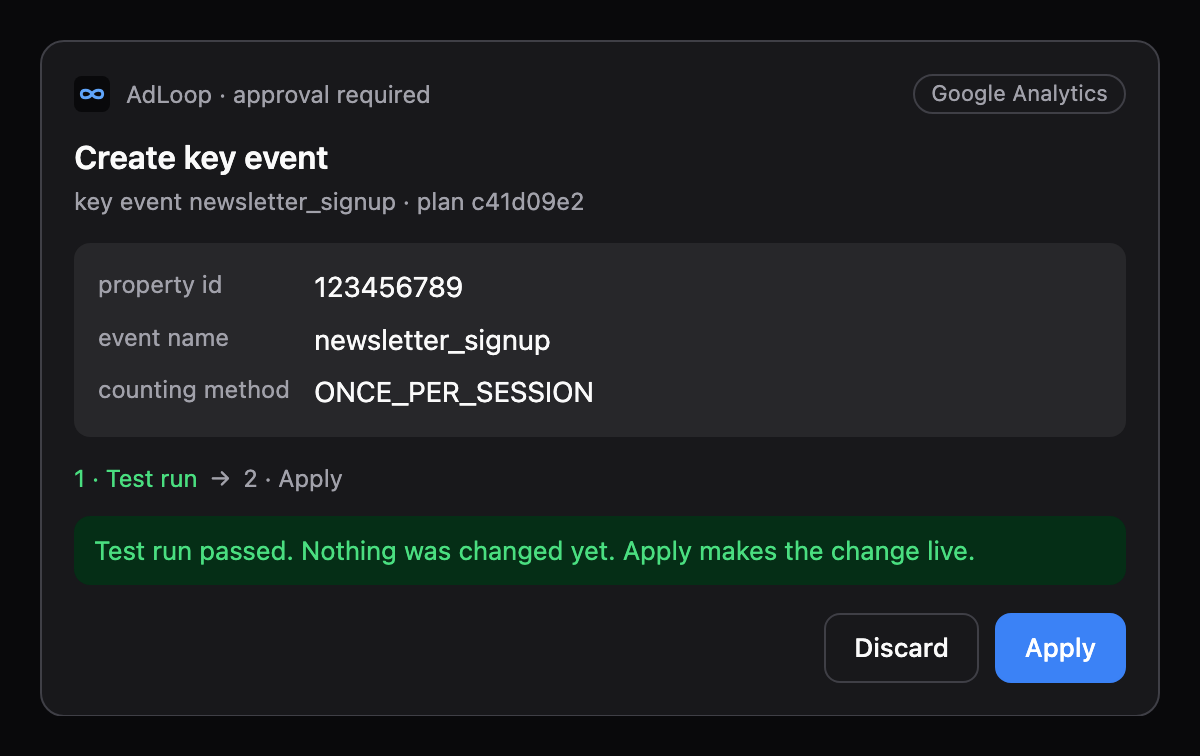
Every change goes through the same steps as an ad change. The assistant drafts it, you see a preview, and nothing happens until you approve it, with a click on Apply in apps that show the approval card. The preview says what people tend to forget: a key event only counts from now on, and a new custom dimension only fills from the day it exists. GA4 has no test mode like Google Ads, so AdLoop’s test run reads the property again instead. It checks for a duplicate or a full property, and it refuses the change if someone edited the same thing in GA4 since the preview.
It works the other way round too. When AdLoop changes a budget or a bid in Google Ads, it offers to note that as an annotation in GA4. A month later the jump in the chart comes with its explanation.
What it costs
At AdLoop, Analytics never counts toward a limit, on any plan, the free one included. The free plan covers one GA4 property, plus one ad account per platform if you advertise. For several properties, as agencies have them, the Agency plan gives every client a profile with its own property, for $129 a month. The cross-checks that also read Google Ads count as Google Ads operations. Everything else is on the pricing page.
Frequently asked questions
Is there an official Google Analytics MCP server?
Yes, googleanalytics/google-analytics-mcp on GitHub, available since 2025. You run it yourself with your own Google Cloud project. It reads GA4 reports, funnels and attribution included, and the current version can also create annotations, custom dimensions and key events if you allow it, without a preview.
Does it work with Universal Analytics?
No. Google switched Universal Analytics off in 2023 and 2024, and its API with it. AdLoop and Google’s server both read GA4 only.
Why does GA4 show fewer sessions than Google Ads shows clicks?
Consent. Google Ads counts every click, GA4 only visitors who accepted analytics cookies. In EU traffic, two to five clicks per session is normal.
Can the AI change my GA4 settings?
Only key events, annotations and custom dimensions and metrics, and only after you approve a preview. AdLoop can’t delete data, change settings like data retention, or touch users and permissions.
Does AdLoop store my Analytics data?
No. Reports pass through and are never stored. AdLoop keeps an encrypted access token, your Google email address, the permissions you granted and the property you picked.
Can I connect several GA4 properties?
Yes, on the Agency plan. Every client profile has its own property and its own API keys. The free plan covers one property.
Do I need Google Ads to use it?
No. A workspace can use Google Analytics alone, and AdLoop never limits Analytics calls.
Is it GDPR compliant?
The MCP server runs at Hetzner in Falkenstein, Germany, and the dashboard and database run on Laravel Cloud in Frankfurt. A data processing agreement is part of the terms. The security page lists every provider.
Connect your GA4 property and ask it something. The free plan needs no credit card, and AdLoop doesn’t limit Analytics calls.
Create a free accountSources
- github.com/googleanalytics/google-analytics-mcp
- developers.google.com/analytics/devguides/MCP
- pypi.org/project/analytics-mcp
What this page says about Google’s server comes from its GitHub repository (version 1.1.0 of 6 November 2026) and Google’s developer guide, retrieved 8 November 2026. Google is developing it quickly, so details may change.