Guide
Google Ads MCP, explained by someone who built one
Written by Daniel Klose · Updated 8 November 2026
MCP stands for Model Context Protocol. It’s the standard that lets an AI assistant like Claude or ChatGPT call outside tools, and a Google Ads MCP server is one of those tools. It gives the assistant access to your Google Ads account through the official API. You ask in the chat and get an answer built on your actual account data.
I’m Daniel. I build AdLoop, one of these servers. I started it for myself after too many Sunday evenings in the Ads interface, and it grew from there. Below you’ll find what these servers are good for and how Google’s own server compares with mine. Where Google’s is the better pick, I’ll say so.
What people use it for
A few things you can ask:
- “Which search terms cost money in the last 30 days without a single conversion? Suggest negatives.”
- “Go through this account and show me where the budget leaks.”
- “Write three new responsive search ads for the Winter Boots ad group, based on the headlines that already work.”
- “Conversions dropped last week. Is that tracking or real?” (This one needs GA4 connected as well, so the assistant can compare clicks with what happened on the site.)
- “Pause every keyword that spent more than $50 in 90 days and never converted.”
The first four only read. The last one changes your account, and before you pick a server you should know exactly what happens in that moment.
Google’s official server and AdLoop
Google publishes its own Google Ads MCP server on GitHub (googleads/google-ads-mcp). Google’s guide calls the current release read-only. The version on GitHub has since gained tools for creating assets and managing labels, but it still can’t create a campaign or change a bid. Pausing isn’t there either. What it does well is run GAQL queries, the SQL-like language of the Google Ads API. If you’re a developer and that’s all you need, it’s free and it does the job.
You run it yourself, either on your own machine through pipx or on Google Cloud Run. Before that you need a Google Cloud project with Google Ads API access. Since 9 September 2026 that access belongs to the project, and developer tokens are gone. Explorer access is usually granted automatically and allows 2,880 operations a day on real accounts. You also need an OAuth client or gcloud credentials.
AdLoop comes in two editions with the same tools. The open-source version runs on your machine and needs the same Cloud project setup. AdLoop Cloud is hosted by me in Germany: you sign in with Google and skip the Cloud project entirely.
| Feature | Google’s server | AdLoop open source | AdLoop Cloud |
|---|---|---|---|
| Runs on | your machine or your Cloud Run | your machine | our servers in Germany |
| Reading | GAQL queries | ready-made reports plus GAQL | same as open source |
| Changes | assets and labels (GitHub version) | campaigns, ads, keywords, budgets and more, each previewed and dry-run first | same, plus approval cards |
| Besides Google Ads | nothing | GA4, Tag Manager, Search Console, Merchant Center, Reddit Ads | same as open source |
| Setup | Cloud project, API access, OAuth client | Cloud project, API access, OAuth client | sign in with Google |
| Price | free (Apache 2.0) | free (MIT) | free plan, paid from $39 a month |
Getting started with AdLoop Cloud
- Create a free account at getadloop.com. You won’t be asked for a credit card.
- Connect Google. You get Google’s normal consent screen, because AdLoop has passed Google’s verification. Then pick the Ads account your assistant may see, and a GA4 property if you want one.
- Connect your assistant. In claude.ai or ChatGPT you add a custom connector with the address
https://mcp.getadloop.com/mcpand sign in with AdLoop. Claude Code, Cursor, VS Code and other developer tools take the same address, with the same sign-in or an API key from the dashboard. - Ask a real question. “How did my campaigns do in the last 30 days, and where am I wasting money?” is a good first one.
That takes about five minutes. The setup guide for each app shows exactly where the address goes. If you’d rather run the open-source version, the self-hosted guide walks through the Cloud project and API access.
How AdLoop handles changes
An assistant that can change bids can also burn money. So AdLoop never changes anything directly, and these rules live on the server, not in the AI’s instructions. A model that ignores its prompt still can’t get around them.
Every change starts as a preview. Your assistant shows it to you, and nothing happens yet. Next comes a dry run: AdLoop sends the exact change to Google in validate-only mode, Google checks it and executes nothing. A headline over 30 characters or a keyword the policy check rejects fails right there, before anything is live.
The real change needs your approval. In Claude, ChatGPT, VS Code and other apps that show AdLoop’s approval card, that means clicking Apply on the card. Typing “yes, do it” in the chat doesn’t count, unless the workspace owner explicitly allows it. New campaigns and ads are created paused, so you switch them on yourself.
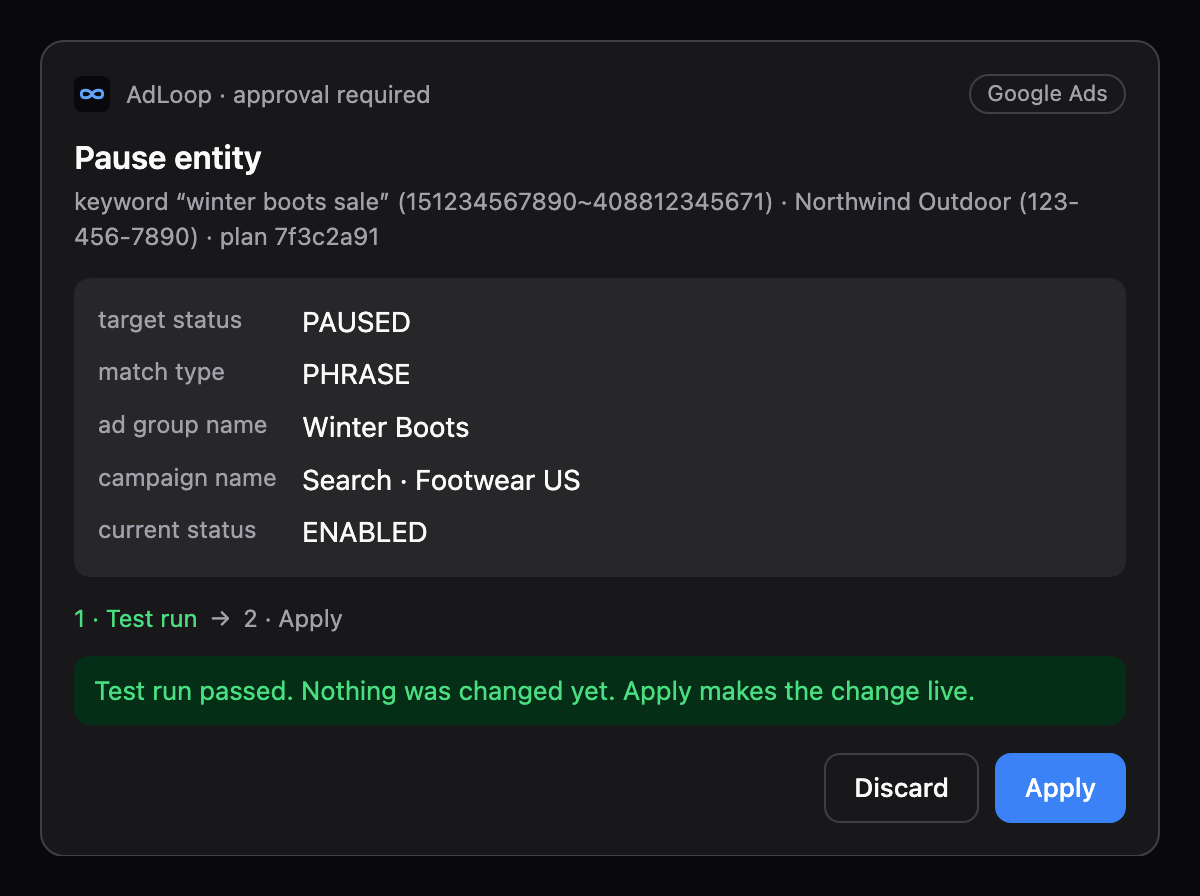
Underneath sit hard limits. One is a daily budget cap, another caps how far a single change can raise a bid. And AdLoop flatly refuses broad match on manual CPC, because that combination is the most common way ad money disappears without anyone noticing. Read-only API keys let a colleague or a client look without being able to change anything, and the change log records who changed what. The full details are in the safety model.
Which assistants work, and what it costs
Anything that speaks MCP works. There are setup guides for Claude (web, desktop and Claude Code), ChatGPT, Cursor, Codex, Gemini, VS Code, Perplexity, Mistral Vibe, Devin Desktop and Zed.
The free plan covers one ad account per platform and one GA4 property, with 100 Google Ads operations a day and 250 a month. Pro costs $39 a month and lifts those limits. Agencies pay $129 a month for as many client profiles as they need. Analytics, Tag Manager, Search Console and Merchant Center never count toward a limit. Everything else is on the pricing page.
Frequently asked questions
What does MCP stand for?
Model Context Protocol. Anthropic introduced it in 2024 as an open standard for connecting AI assistants to tools and data, and most assistants support it by now.
Is there an official Google Ads MCP server?
Yes, on GitHub as googleads/google-ads-mcp. You run it yourself, and it’s built for reading data with GAQL. It doesn’t create campaigns or change bids.
Do I still need a developer token?
No. Google retired developer tokens on 9 September 2026. API access now belongs to a Google Cloud project, so a server you run yourself needs a project with an access level. AdLoop Cloud needs neither.
Can the AI change my campaigns without asking me?
Not with AdLoop. Every change shows up as a preview first, and in apps with approval cards it only goes through when you click Apply.
Is my data used to train AI models?
AdLoop doesn’t train any models. The data your assistant fetches does end up in your conversation, though, so your AI provider’s settings decide what happens to it. In ChatGPT you switch training off under Settings → Data controls (“Improve the model for everyone”), in Claude under the privacy settings (model improvement). Business and team plans of both don’t train on your chats by default.
Does it work for agencies with a manager account?
Yes. On the Agency plan every client gets a separate profile and API keys that only reach that client’s accounts. Usage and the change log are kept per client.
Is it GDPR compliant?
The MCP server runs at Hetzner in Falkenstein, Germany, and the dashboard and database run on Laravel Cloud in Frankfurt. A data processing agreement is part of the terms. The security page lists every provider.
Can I use it for Google Analytics and Reddit Ads too?
Yes, the same connection covers GA4, Tag Manager, Search Console, Merchant Center and Reddit Ads. What AdLoop does with GA4 is in the Google Analytics MCP guide.
Try it on your own account. The free plan needs no credit card, and setup takes about five minutes.
Create a free accountSources
- developers.google.com/google-ads/api/docs/developer-toolkit/mcp-server
- github.com/googleads/google-ads-mcp
- help.openai.com: Data controls in ChatGPT
- support.claude.com: Who can view my conversations
What this page says about Google’s server comes from Google’s documentation and the GitHub repository, retrieved 8 November 2026. Google is still developing it, so details may change.